
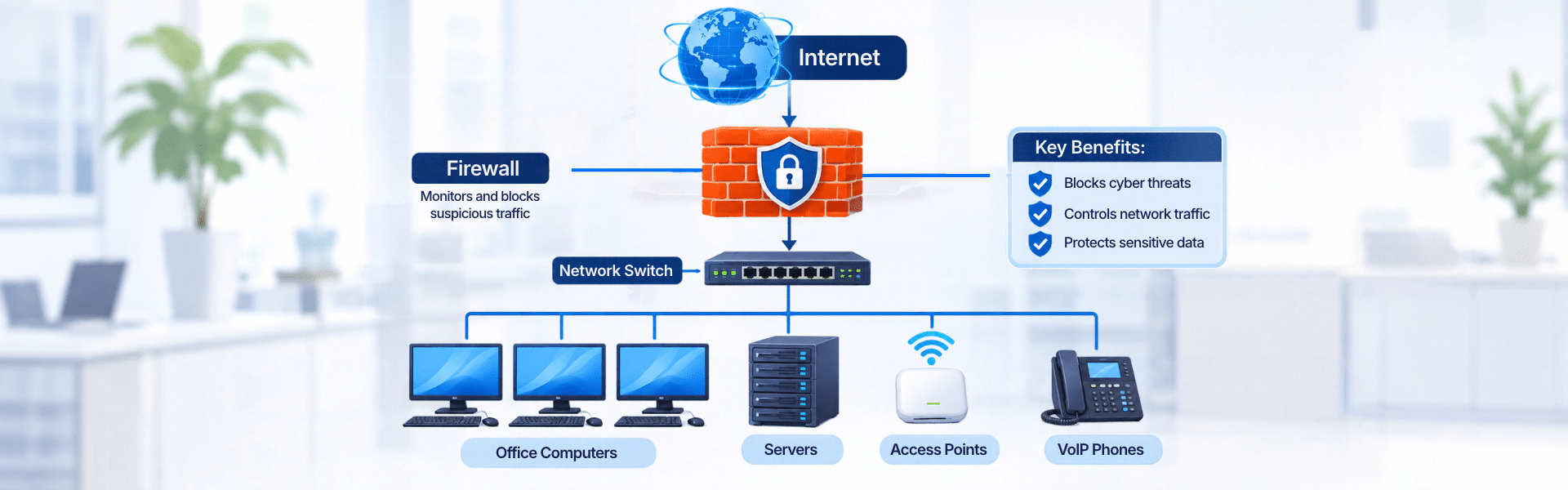
How to Choose the Right Firewall for Your Business?
As businesses become more dependent on the internet, cloud applications and connected devices, protecting the company network has become increasingly important. A single security gap can expose business data, interrupt daily operations and create problems that are expensive to fix.
This is why a firewall is an important part of a business network. It helps monitor incoming and outgoing network traffic and blocks connections that do not meet defined security rules.
However, choosing a firewall is not as simple as picking a model with a higher number or more features. The right choice depends on your network size, number of users, security requirements and the type of applications your business uses.
In this guide, we will look at what businesses should consider when selecting a firewall and how to choose a solution that fits their requirements.
What Is a Business Firewall?
A business firewall is a network security device or software that monitors and controls traffic entering and leaving an organisation’s network.
It works according to predefined security rules. These rules help identify which connections should be allowed and which should be blocked.
For example, a firewall can help prevent unauthorised access to internal systems, restrict access to suspicious websites and monitor network activity.
Modern business firewalls offer more than basic traffic filtering. Many include features such as intrusion prevention, application control, VPN connectivity, web filtering and advanced threat protection.
These capabilities make firewalls an important part of network security for offices, enterprises, data centres and other organisations.
Why Does Your Business Need a Firewall?
Every organisation that uses an internet-connected network faces some level of security risk. Even a small office with a few computers can become a target for cyberattacks.
A properly configured firewall helps businesses manage these risks.
Some key reasons to use a business firewall include:
1. Protection against unauthorised access
A firewall helps prevent unauthorised users and suspicious connections from accessing your internal network.
2. Network traffic monitoring
It monitors network traffic and applies security policies to control how devices and applications communicate.
3. Protection against network threats
Advanced firewalls can identify and block certain malicious traffic, suspicious activity and known attack patterns.
4. Secure remote access
Many business firewalls support VPN connections, allowing authorised employees to access company resources securely when working remotely.
5. Better control over internet usage
Features such as web filtering and application control help businesses manage access to websites and online applications.
Types of Firewalls Businesses Should Know About
Before selecting a firewall, it is useful to understand the main types available.
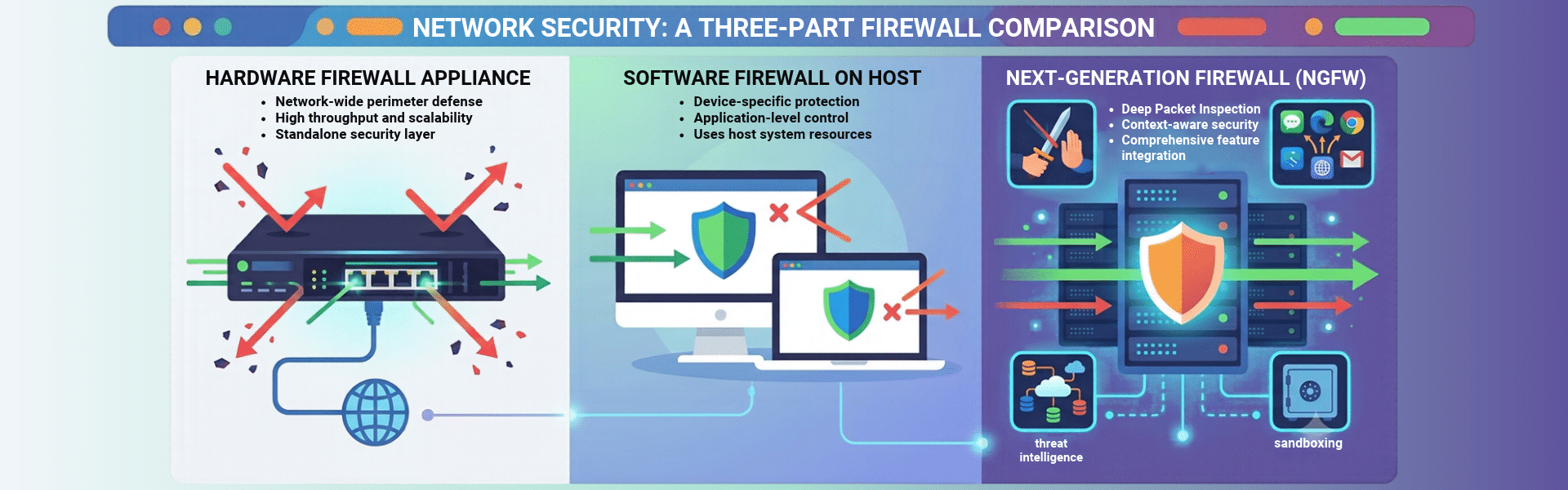
1. Hardware Firewall
A hardware firewall is a physical security device installed between the business network and the internet.
It monitors network traffic passing through it and applies security policies to protect connected devices.
Hardware firewalls are commonly used in offices, corporate networks, educational institutions, hospitals and enterprise environments.
They are particularly useful when a business needs centralised network protection for multiple users and devices.
2. Software Firewall
A software firewall is installed on an individual computer or server. It monitors traffic entering and leaving that specific device.
Unlike a hardware firewall, which can protect an entire network, a software firewall generally provides protection at the device level.
Businesses often use software firewalls as an additional security layer alongside network security devices.
3. Next-Generation Firewall (NGFW)
A Next-Generation Firewall, commonly known as an NGFW, offers more advanced security capabilities than traditional firewalls.
Apart from basic traffic filtering, it can include features such as:
Intrusion Prevention System (IPS)
Application control
Deep packet inspection
URL and web filtering
Malware and threat protection
VPN support
NGFW solutions are suitable for businesses that need greater visibility and control over their network traffic.
Traditional Firewall vs Next-Generation Firewall
A traditional firewall mainly controls network traffic based on rules such as IP addresses, ports and protocols.
A next-generation firewall provides additional security capabilities that help inspect traffic more deeply and identify certain threats that basic filtering may not detect.
| Feature | Traditional Firewall | Next-Generation Firewall |
|---|---|---|
| Traffic filtering | Yes | Yes |
| IP and port-based rules | Yes | Yes |
| Application control | Limited or unavailable | Available |
| Intrusion prevention | Not typically included | Commonly included |
| Deep packet inspection | Limited | Available |
| Advanced threat protection | Limited | Available, depending on solution |
For businesses with basic network requirements, traditional firewall capabilities may be sufficient. However, organisations handling sensitive data, using multiple cloud applications or supporting remote employees may benefit from an NGFW.
The right choice depends on the level of protection and network visibility your organisation requires.
Important Features to Check Before Buying a Business Firewall
Not every firewall offers the same features. Before purchasing one, compare the capabilities that matter to your business.
1. Firewall Throughput
Firewall throughput refers to the amount of network traffic a firewall can process within a given time.
A device with insufficient throughput may become a bottleneck, especially when multiple employees are accessing the internet or using business applications simultaneously.
When comparing models, check both standard firewall throughput and performance with security features enabled.
2. Intrusion Prevention System (IPS)
IPS helps detect and block suspicious network activity associated with known attacks and exploits.
It is an important feature for businesses that want additional protection beyond basic firewall rules.
3. VPN Support
If employees work remotely or multiple office locations need to communicate securely, VPN support becomes important.
Check whether the firewall supports the required VPN types, number of simultaneous connections and expected user capacity.
4. Application Control
Application control allows administrators to identify and manage traffic from specific applications.
For example, a business may want to restrict certain applications while allowing access to approved business tools.
5. Web Filtering
Web filtering helps control access to websites based on categories, security risks or company policies.
It can help reduce exposure to malicious websites and manage internet usage across the organisation.
6. Centralised Management
For businesses managing multiple locations or several security devices, centralised management can make administration easier.
It allows IT teams to manage policies, monitor activity and maintain security settings from a central platform.
7. Security Subscription and Renewal Costs
Some firewall features require an active security subscription.
Before buying, check what is included in the device price and what requires an additional licence or renewal. Compare the total cost over the intended usage period rather than looking only at the initial hardware price.
How to Choose a Firewall Based on Your Business Requirements
The firewall you need depends on how your network is structured and what you expect it to handle.
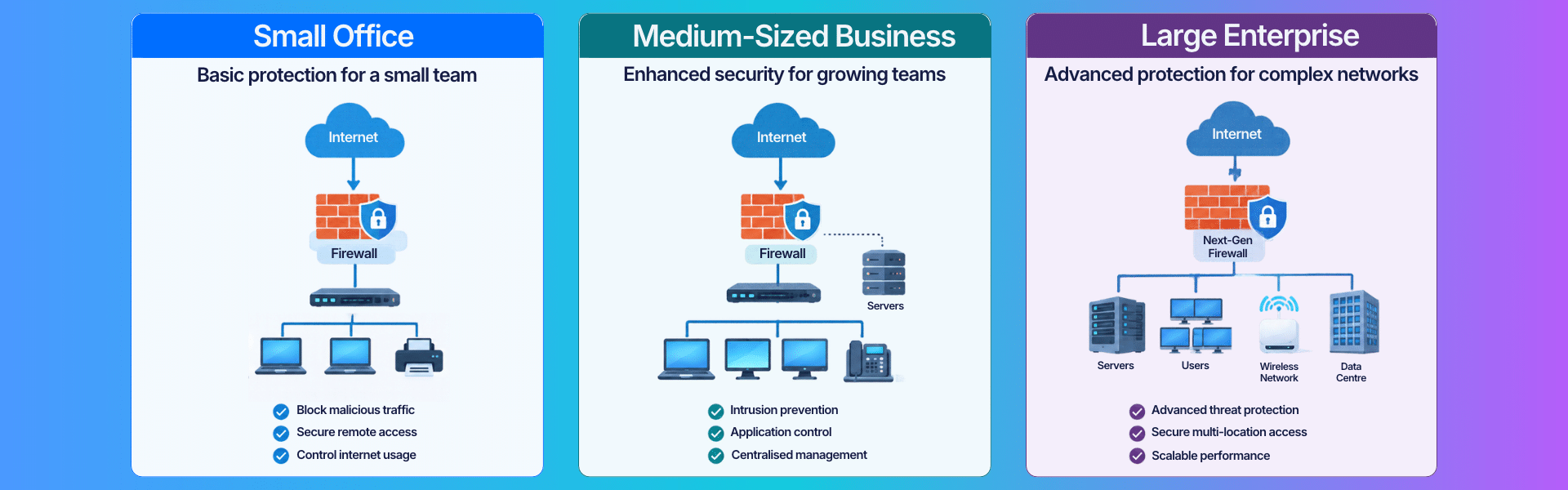
Small offices
A small office may need a firewall that provides basic network protection, VPN access, web filtering and sufficient throughput for its number of users.
Avoid choosing a device only because it is inexpensive. Make sure it can handle your internet connection and expected network traffic.
Medium-sized businesses
Businesses with more employees, multiple departments and greater dependence on cloud applications may need stronger security capabilities.
Features such as application control, intrusion prevention, VPN support and centralised management become more relevant.
Large enterprises
Enterprise networks often have multiple locations, large numbers of users and more complex security requirements.
They may require higher-throughput firewall appliances, advanced threat protection, centralised policy management and integration with existing network security systems.
Data centres and high-traffic environments
These environments require careful performance planning. Firewall selection should account for traffic volume, concurrent connections, application requirements, redundancy and future expansion.
Popular Business Firewall Brands
Several established brands offer firewall solutions for businesses with different network sizes and security requirements.
The best option depends on the features, performance, licensing and management requirements of your organisation.
Fortinet
Fortinet offers FortiGate firewall solutions designed for different business and enterprise network environments.
FortiGate models include features such as application control, intrusion prevention, VPN and security services, depending on the model and licence.
Businesses often consider Fortinet when looking for integrated network security and centralised management capabilities.
Sophos
Sophos offers firewall solutions through its Sophos Firewall range.
Its solutions include features for network protection, web filtering, intrusion prevention, VPN and security management.
Sophos can be considered by businesses looking for network security with visibility and control over users and applications.
SonicWall
SonicWall provides firewall solutions for small businesses, distributed organisations and enterprise environments.
Its firewall range includes capabilities such as intrusion prevention, application control, VPN and threat protection, depending on the product and subscription.
It is another option businesses can evaluate when comparing network firewall solutions.
The important thing is not to select a brand based only on its popularity. Compare the specific models and their capabilities against your actual network requirements.
Common Mistakes to Avoid When Buying a Firewall
A firewall is a long-term investment in network security. Choosing the wrong device can create performance problems or leave important security requirements unaddressed.
Here are some common mistakes to avoid:
Choosing only by price: A low-cost device may not provide the performance or security features your network needs.
Ignoring firewall throughput: Always check performance with security services enabled, not just the headline firewall throughput.
Not considering future expansion: Your number of users, devices and network traffic may increase over time.
Overlooking subscription costs: Security services and licence renewals can add to the overall cost.
Ignoring VPN requirements: Remote employees and branch offices may need more VPN capacity than initially expected.
Not checking compatibility: Make sure the firewall fits your existing network setup, internet connection and management requirements.
A little planning before purchasing can help avoid unnecessary upgrades and additional costs later.
Final Thoughts
Choosing the right business firewall requires more than comparing product prices or specifications. You need to understand your network size, traffic requirements, security needs and future expansion plans.
For some organisations, a basic firewall may be enough. Others may need a next-generation firewall with advanced threat protection, application control and centralised management.
Fortinet, Sophos and SonicWall offer solutions for different business requirements. Compare the available models carefully and select one that matches your network rather than paying for features you may not need.
If you are planning to upgrade your network security or purchase a new firewall, ITBABAONLINE can help you explore suitable firewall options for your business requirements.
There is no single firewall that is best for every business. The right choice depends on the number of users, network traffic, security requirements, VPN needs and budget. Fortinet, Sophos and SonicWall are among the brands businesses can compare.
A router connects different networks and directs data between them. A firewall monitors and controls network traffic based on security rules. Some business devices combine routing and firewall capabilities, but their functions are different.
Yes. Small businesses also use internet-connected devices, business applications and sensitive information. A suitable firewall helps protect their network against unauthorised access and suspicious traffic.
A Next-Generation Firewall (NGFW) combines traditional traffic filtering with additional security features such as intrusion prevention, application control and deep packet inspection.
The cost depends on the brand, model, performance capacity, security features and subscription requirements. Some models are designed for small offices, while enterprise firewalls can have significantly higher capacity and licensing costs.
Many business firewalls offer additional security services through annual or multi-year subscriptions. The exact renewal requirements depend on the model and the features being used. Check the licence details before purchasing.
Yes, depending on the network design and firewall capabilities. Businesses can connect multiple locations using site-to-site VPNs or other supported network configurations. Each location’s traffic and security requirements should be considered when planning the setup.